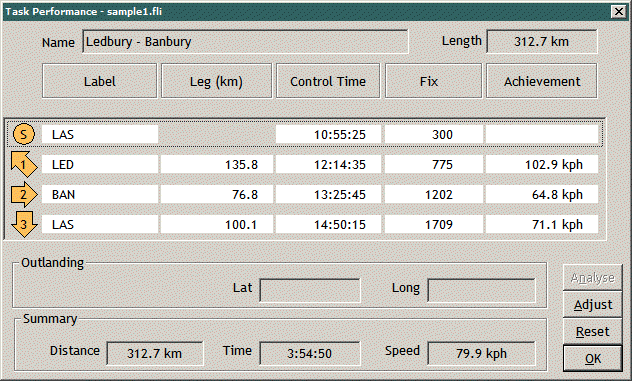
Use the Task Performancecommand to see
an analysisof
flight performance.
The
control timeand
achievement are shown for eachleg - together with the sequence
numberof
the GPS fix which satisfied that control. You can
override the default analysisto specify different GPS fixes
which areto
be regarded as satisfying the controls. Press the
Adjust button to overridethe default analysis.
The
next picturesshow how analyses of thermal climbs,and
inter-thermal glides, can bedisplayed.
Use theThermals
command to display an anlysisof
thermal climbs,and inter-thermal glides.
The initial dialog shows summary climbstatistics
for the whole flight, for thetask
and for each task leg.
Use the
Drill buttonto see
detailed climb analysis foreach
thermal. In this
illustration the secondtask
leg has been selected to be thestart
for the detailed analysis.
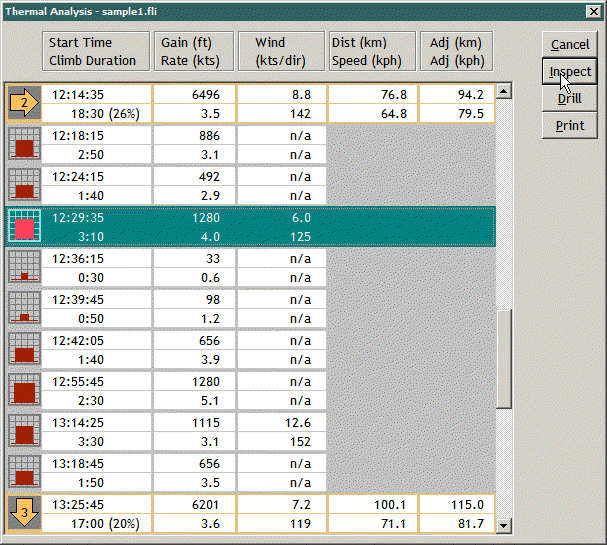
The
next pictureshows
how that detailed analysis for leg2 is presented.
This picture showsthe
Thermal Analysis dialog at the secondof
its three drill levels.
A summary for task leg 2 is the top row of data.
Succeeding rows are individualclimbs
within that leg.
Use the Drill buttonagain
to add inter-thermal glidesto
the dialog.
Use
the Map buttonto zoom the
map window to show theflight
segment around aselected
climb or glide.
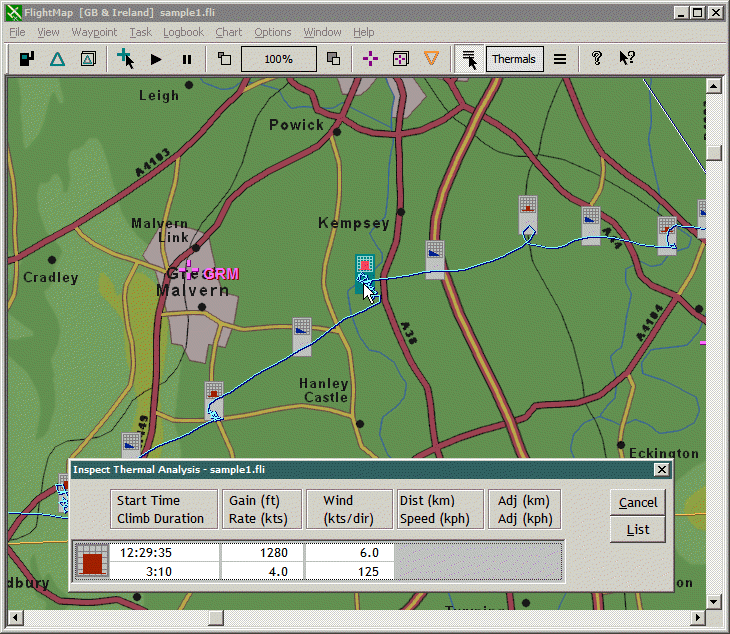
A new map layeris
then displayed to annotate each climb and glide.
The next picture illustratesthat
thermal analysis maplayer.
The
results ofthermal analysis are presented asgraph
icons which tag the flight track.
There are results both for thermal climbsand
for inter-thermal glides.
Use the Inspectbutton
to interrogate the tag icons. The
Thermal Analysis dialog is presented toshow
data for the individual iconselected.
The next pictureshows
how thermal analysis can alsobe
interrogated from the Barographwindow.
The
Barographwindow
displays a colour codedtimeline that runs beneath the trace
toillustrate
the thermal analysisresults.
In this
picture,the Inspect
command is active and isoperating on the thermal analysis
layer. As the
mouse moves across the trace,the corresponding analysisresult is highlighted. When the left mousebutton is pressed, the
Thermal Analysisdialog is presented for that
highlightedresult in
the same manner as illustrated in the map pictureabove.